What is Webflow AEO?
Search is no longer just about Google. AI-powered platforms like ChatGPT, Perplexity, and Google's AI Overviews are increasingly the first place users get answers and they pull from websites that are structured for AI readability. AEO, or AI Engine Optimization, is the discipline of making your content visible and citable to these AI systems.
Webflow AEO is the platform's native solution to this challenge. Rather than relying on third-party tools, Webflow has built the entire AEO workflow directly into its CMS from site scanning and issue detection to fix queuing and content generation.
The agent layer: site-wide AI visibility scanning
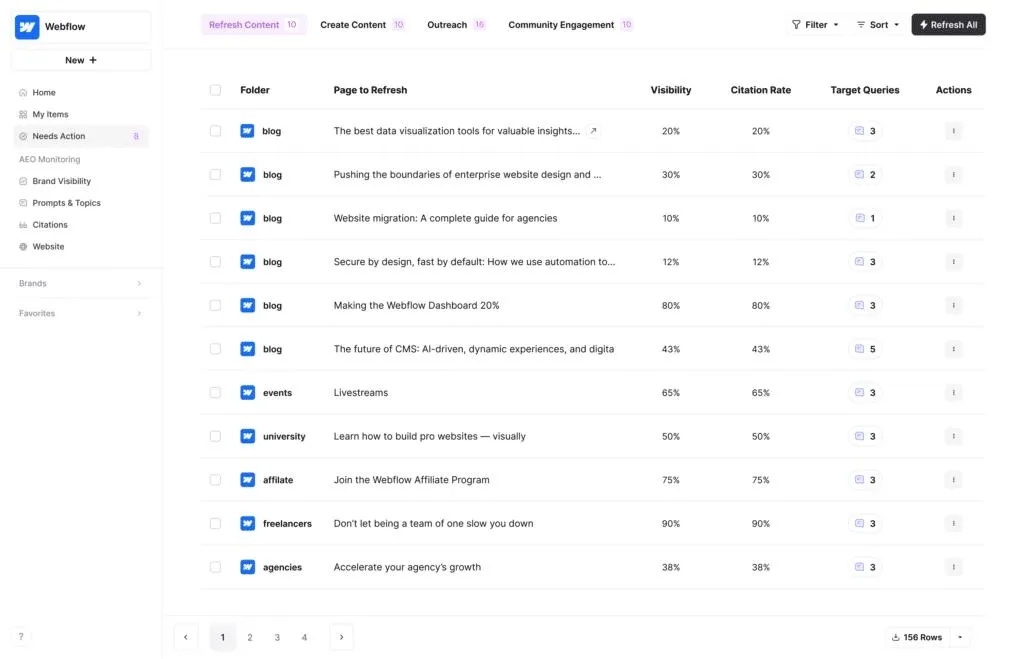
The most technically impressive piece of Webflow AEO is its agent layer. This automated system crawls your entire website pages, CMS items, components, and images and identifies everything that could be reducing your AI visibility.
Previously, fixing AEO issues at scale was a manual, time-consuming process. Teams had to audit page by page, patch issues one at a time, and hope the fixes were consistent. Webflow has collapsed that process into a single queue. The agent finds the problems; you clear the queue. This is a meaningful operational shift for marketing and content teams managing large Webflow sites.
Content intelligence: citation gaps and CMS-native drafts
Beyond technical fixes, Webflow AEO also brings a layer of content intelligence. It can identify citation gap areas where your site is missing content that AI engines would typically source when answering user queries in your niche. It then goes a step further by suggesting specific pages worth creating to fill those gaps, and generating a first draft of that content directly inside the Webflow CMS.
For content-heavy teams, this removes a significant amount of the friction that slows down AEO work. Instead of moving between an AI writing tool, a keyword research platform, and a CMS, the core workflow now lives in one place.
AI bot insights: the data layer worth watching
Of all the features in this release, AI bot insights may be the most strategically valuable over time. This feature shows you which AI bots Googlebot, GPTBot, PerplexityBot, and others are crawling which pages, and how that activity changes over time.
Right now, most marketing teams have no visibility into how AI systems interact with their site. Standard analytics tools track human visitors; they don't surface bot-level behavior from AI crawlers. Webflow AEO changes that, giving teams a clear view of which content is being picked up for AI-generated answers and which is being ignored. Over time, this kind of data will be as important as traditional organic search metrics.
Availability: private beta and enterprise-only for now
Webflow AEO is currently in private beta and only available to Enterprise customers. This limits immediate access, but it also signals that Webflow is treating this as a serious, infrastructure-level feature rather than a lightweight add-on. For teams already on Webflow Enterprise, getting on the waitlist should be a priority.
Why this matters if you're on any other CMS
No other major CMS WordPress, Contentful, Sanity, or otherwise has built AEO tooling natively into the platform at this level. Most teams doing AEO work are stitching together separate tools: a crawler, an AI writing assistant, a bot analytics solution, and a CMS. Webflow has integrated all of it.
This is the kind of platform-level differentiation that compounds over time. As AI-driven search becomes a larger share of discovery traffic, having AEO baked into your content infrastructure becomes a real competitive advantage. If your CMS roadmap is up for review, this release is worth factoring in.
Webflow AEO: feature summary
Agent layer
Scans pages, CMS, components & images for AI visibility issues
Content intelligence
Spots citation gaps, suggests pages, drafts content in CMS
AI bot insights
Tracks which AI crawlers hit which pages over time
Availability
Private beta — Webflow Enterprise only
What is Webflow AEO?
Webflow AEO (AI Engine Optimization) is a native Webflow feature that helps websites become more visible to AI-powered search platforms like ChatGPT, Perplexity, and Google's AI Overviews. It scans your site for AI visibility issues, suggests content improvements, and provides analytics on AI bot crawl behavior — all within the Webflow interface.
How is AEO different from traditional SEO?
Traditional SEO optimizes your content for human-facing search engine results pages (SERPs). AEO optimizes your content to be cited and surfaced by AI systems when they answer user queries. This includes structured content, clear entities, citation-worthy answers, and schema that AI crawlers can easily interpret.
What does the Webflow AEO agent layer actually do?
The agent layer automatically crawls your entire Webflow site — including individual pages, CMS collection items, components, and images — and identifies anything that is reducing your AI visibility. It then queues all identified issues in a single dashboard so your team can resolve them efficiently without manual page-by-page audits.
Can Webflow AEO help create new content?
Yes. The content intelligence feature within Webflow AEO can identify citation gaps — topics where your site lacks content that AI engines would typically source. It suggests specific pages worth creating to close those gaps and can generate a first draft of that content directly inside the Webflow CMS.
What are AI bot insights in Webflow AEO?
AI bot insights is a reporting feature that shows you which AI crawlers (such as GPTBot or PerplexityBot) are visiting your site, which pages they are crawling, and how those patterns change over time. This gives marketing teams visibility into how AI systems are consuming their content — data that standard analytics tools do not provide.
Who can access Webflow AEO right now?
As of the initial rollout, Webflow AEO is in private beta and is only available to Webflow Enterprise customers. There is currently no confirmed timeline for a broader release, but teams on Enterprise plans can contact Webflow to request early access.
Is Webflow the only CMS offering native AEO tools?
As of this release, Webflow is the only major CMS to offer a fully integrated, native AEO workflow — combining site scanning, content generation, and AI bot analytics in one platform. Other CMS platforms like WordPress or Contentful require third-party integrations to replicate similar functionality.
Should I switch to Webflow just for AEO?
If your team is already evaluating CMS platforms, Webflow AEO is a meaningful differentiator worth factoring in — especially if AI-driven search is a growing part of your acquisition strategy. For teams already on Webflow Enterprise, adopting AEO is a natural next step. For others, it is worth monitoring as the feature becomes more broadly available.